You see accessibility every day without thinking about it. The same principle applies to the digital tools your workforce depends on every day. And for public institutions, getting it right is no longer optional.
What ADA Title II and WCAG 2.1 require from scheduling tools
ADA compliance for scheduling software means any web or mobile tool a public institution uses for shifts, time clocks, or workforce activity must meet the WCAG 2.1 Level AA standard.
The Department of Justice's Title II rule makes this explicit for state and local governments. It covers websites, mobile apps, staff portals, and the systems employees use to clock in, view schedules, request time off, and swap shifts. If that activity happens in a digital tool, that tool is in scope.
The rule points to the Web Content Accessibility Guidelines (WCAG) 2.1 Level AA as the technical standard. For scheduling platforms, real compliance means more than adding alt text to a few icons. The entire workflow, from login to shift confirmation, has to work for people using screen readers, keyboard-only navigation, magnification, or other assistive technologies.
The window for action is closing. Existing ADA obligations apply right now, and federal regulators have signaled they'll enforce the new requirements when the time comes. Many IT departments are already using WCAG 2.1 AA as a pass/fail bar at contract renewal. Since remediation and platform transitions usually take 12 to 18 months, the smart move is to start before deadlines are knocking.
Who depends on accessible scheduling software tools
According to the CDC, more than 1 in 4 U.S. adults, over 70 million people, report having some form of disability. That includes vision, hearing, mobility, and cognitive differences like dyslexia and ADHD.
The audience is even bigger when you account for situational and temporary needs: a parent holding a sleeping baby, a nurse three hours into a double shift, a line cook checking next week's schedule in bright sunlight, an older employee whose vision and dexterity have shifted naturally over time.
Your workforce isn't sitting at a quiet desk in good lighting. They're on phone screens in noisy kitchens and dim parking garages. Accessible design works in those conditions. Inaccessible design fails the moment anything is less than perfect.
Your scheduling tool accessibility checklist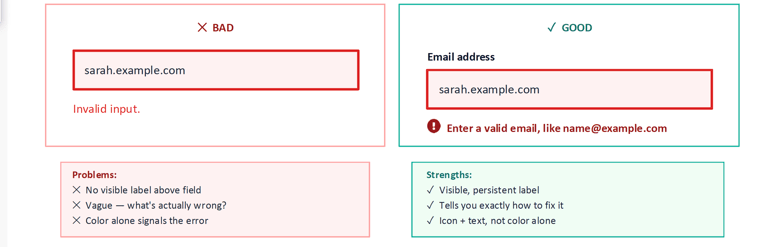
A useful gut-check for your current platform. If you can't confidently tick most of these boxes, your next renewal cycle is the right time to act.
- Full keyboard navigation. Every button, menu, and action can be reached with Tab, Shift+Tab, Enter, Space, and arrow keys.
- Visible focus indicators. A clear outline always shows where the cursor is on the page.
- Screen reader compatibility. Shift cards, buttons, and alerts are announced with meaningful labels (e.g., "Delete shift for Sarah M., button"), not generic "button" or "link." Works with NVDA, JAWS, VoiceOver, and TalkBack.
- WCAG-compliant color contrast. A minimum 4.5:1 ratio for normal text and 3:1 for large text, so content stays readable in sunlight, low light, and high-contrast modes.
- No reliance on color alone. Shift statuses (approved, pending, dropped) use text labels or icons in addition to color.
- Clear, helpful error messages. Errors identify the field, explain the problem, and tell the user how to fix it, with both an icon and text.
- Visible, persistent form labels. Field labels stay visible above inputs, not hidden in placeholder text that disappears when typing.
- Reflow at 200 percent zoom. The schedule grid and controls remain fully usable when text is enlarged.
- Mobile accessibility. The same standards apply on iOS and Android, where most shift workers actually live.
- Captioned video content. Any in-app tutorials or onboarding videos include captions.
Is Your Department Ready?
The ADA Compliance Webinar.

Want acess to our webinar recording to give you a complete understanding of ADA compliance for your scheduling tools?
Get Webinar Access
Practical steps to close ADA gaps before your next renewal
Start by mapping the key user journeys for employees, student workers, supervisors, and administrators. Document which tasks are essential for running operations, publishing schedules, approving swaps, tracking time, and check how accessible each step is today. This keeps remediation focused on real-world use, not generic checklists.
If your internal team has limited capacity, consider engaging an accessibility specialist. Many IT departments already work with partners who can test against the ADA Title II rule and WCAG criteria. Their reports usually categorize findings by severity, so departments can quickly see which issues to address first.
Tie this work directly to procurement and contract dates. If your platform is up for renewal in the next 12 to 18 months, you will want a clear path: either a remediation commitment with timelines from your current vendor, or a transition plan to a more accessible solution. The key is to avoid surprises at renewal. A documented plan demonstrates progress and reduces risk during internal reviews and external inquiries.
Questions to ask scheduling, workforce, and time-tracking vendors about ADA and WCAG 2.1 compliance
When speaking with scheduling, workforce management, or time-tracking vendors, ask for a current accessibility conformance report, details on how they meet WCAG 2.1 Level AA, and specific examples of how users complete core workflows with assistive technology.
A good starting point is a Voluntary Product Accessibility Template, or VPAT. This outlines where the platform conforms, partially conforms, or does not yet meet specific success criteria. Ask when the report was last updated and whether it reflects the current version of the software you would be buying.
Request a live demonstration focused on accessibility, not just general features. Have the vendor show how a user navigates the schedule grid using only the keyboard, how screen readers announce shifts and notifications, and what happens when someone submits an incomplete form.
Clarify their roadmap and support. Are they monitoring the transition from WCAG 2.1 to newer standards? How do they handle accessibility regressions when new features are released? Do they provide guidance or configuration options to help your department meet internal policies and ADA obligations?
Document these conversations and share them with IT, procurement, and accessibility stakeholders. Clear, specific vendor answers make it easier to choose tools that support both compliance and a better experience for everyone who depends on your scheduling system.
Have questions specific to your organization?
If you missed the live session or want a closer look at how this applies to your team, schedule a time with us, and we'll walk through it together.